AI vs Chatbots: Key Differences for Small Businesses
AI vs Chatbot, Small Business AI Automation, Customer Communication
AI vs. Chatbots: What’s the Difference for Small Businesses?
Every software company now claims to offer “AI,” but many tools are really just basic chatbots with better marketing. For a small business, that difference is not just technical—it can determine whether a website visitor becomes a booked appointment or leaves your site frustrated. You do not need to become an AI expert; you just need to understand what a chatbot can do, what true AI can do, and which one your business actually needs before you invest.
What Is the Difference Between AI and a Chatbot?
📌 Short Answer: A chatbot is usually a scripted tool that follows preset rules, menus, or keyword triggers. AI uses natural language understanding to interpret what someone means, maintain context, respond to unexpected questions, and guide the conversation more naturally.
Simple comparison:
– Chatbots follow scripts. AI understands intent.
– Chatbots collect information. AI can qualify leads.
– Chatbots often break when the conversation goes off-script. AI can adapt and ask better follow-up questions.
Why This Difference Matters for Small Businesses
When you run a local service business, real estate practice, clinic, agency, or any appointment-based business, every conversation is an opportunity. The tool you choose—basic chatbot or true AI assistant—affects:
How quickly new leads get a response (especially after hours)
Whether visitors feel helped or pushed through a script
How well leads are qualified before they reach your team
If appointments actually get booked—or just “requested”
In other words, the choice between AI vs chatbot is really a choice between basic website chat and a practical AI employee that helps capture, qualify, and convert leads around the clock.
What Is a Chatbot?
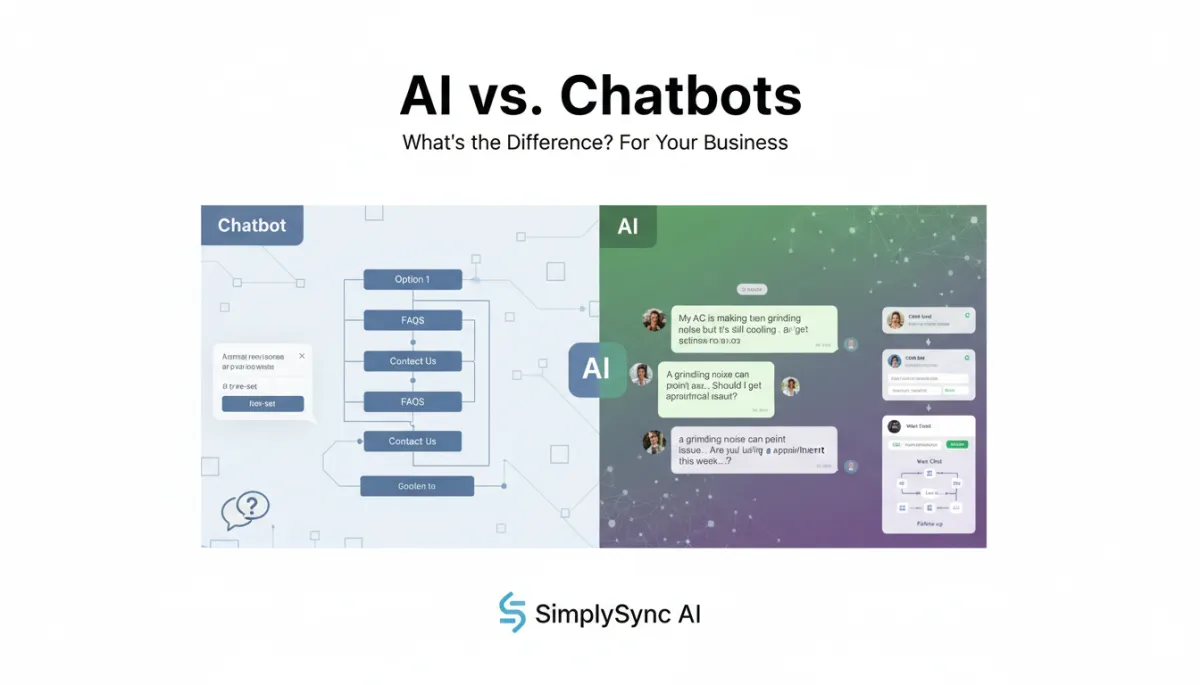
A chatbot is a rule-based conversation tool. Think of it as a digital flowchart that lives on your website or in your messaging channels. If a visitor clicks one option, it shows the next option. If they type a keyword you’ve set up, it sends a preset response.
Common Chatbot Uses
Answering basic FAQs (hours, location, pricing ranges)
Collecting names, emails, and phone numbers for callbacks or quotes
Routing visitors to a specific page (services, contact, pricing)
Providing business hours or basic service descriptions from a menu
Offering preset scheduling links for visitors to click and book
Asking simple intake questions before passing the lead to a person
Where Basic Chatbots Fall Short
For many small businesses, these basic features sound helpful—until real customers start asking real questions. That is where a simple website chatbot often shows its limits:
Struggles with unexpected questions: If a visitor asks something outside the script, the bot may reply, “I’m not sure,” or loop back to the menu.
Limited understanding of nuance: It treats “I need urgent help with a leak” the same as “I’m just curious about pricing.”
Poor memory: It may forget what the visitor said two steps ago and ask for the same info again, which feels robotic and annoying.
Menu-heavy experience: Visitors are forced to click through options instead of just explaining what they need in their own words.
Shallow qualification: It may collect contact info but rarely understands budget, timing, or fit in a meaningful way.
For a business that just wants a simple FAQ widget, a chatbot can be enough. But if you rely on your website, ads, or missed calls to drive revenue, these limitations can quietly cost you leads every week.

Rule-based chatbots follow rigid paths, while AI assistants adapt to real conversations.
What Is True AI for Small Business Conversations?
True AI goes beyond scripts. It uses natural language understanding to figure out what a person means, not just what they literally typed. It can keep track of the conversation, ask clarifying questions, and respond in a way that feels more like a helpful human assistant than a menu.
How AI Understands Real-World Language
A good example is how AI handles different ways of saying the same thing. For a home services company, AI can recognize that:
– “My AC is running but the house is still hot”
– “My air conditioner is not cooling”
– “The unit turns on but it never gets cold inside”
all point to the same type of problem. Instead of asking the customer to pick from a menu, AI can respond in natural language, ask smart follow-up questions, and move directly toward booking a visit.
What True AI Can Help With
Natural conversations: Let customers explain their situation in their own words instead of clicking through options.
Lead qualification: Ask about timing, budget, location, and service type to prioritize high-value opportunities.
Urgency detection: Recognize words like “flooding,” “no heat,” or “same-day” and treat them differently from casual inquiries.
Appointment booking: Connect to your calendar or scheduling tool to offer real-time booking, not just a link to a form.
Customer question handling: Answer detailed questions about services, process, or preparation based on your content and policies.
Follow-up: Send reminders, confirmations, and check-ins via SMS or email after the first conversation ends.
CRM updates: Log conversations, create or update contact records, and move deals through your pipeline automatically.
Human handoff: Recognize when a conversation is sensitive or complex and notify your team to jump in.
Multi-channel communication: Work across website chat, SMS, email, and even voice so leads are never left waiting.
SimplySync AI focuses on this kind of practical AI assistant. Instead of dropping a generic chatbot widget on your site, SimplySync AI helps you build an AI system that supports the full lead journey—from first contact to qualification, booking, follow-up, and handoff to your team.
Why Most “AI Chatbots” Are Not Really AI
Because “AI” sells, many vendors now label their basic chat widgets as “AI chatbots.” But if you look closely, the experience is still mostly scripted. The tool may use some AI behind the scenes, but for your customers it behaves like a traditional chatbot: rigid, limited, and quick to get stuck.
A Simple Test to Tell AI vs Chatbot Apart
When you evaluate an AI chatbot for business, ask these questions:
Can it handle questions it was not specifically programmed for?
Can it remember what the visitor said earlier in the conversation?
Can it ask intelligent follow-up questions based on the situation?
Can it identify urgency and treat urgent leads differently?
Can it route high-value or complex leads to a person in real time?
Can it update your CRM or pipeline automatically, not just send an email?
Can it improve based on real conversations and training on your business?
If the answer to most of these questions is “no,” you are likely looking at a chatbot with AI branding, not a true AI assistant for small business automation.
AI vs. Chatbots: Side-by-Side Comparison
Capability Basic Chatbot True AI Assistant Answer basic FAQs Yes Yes Collect contact info Yes Yes Understand varied phrasing Limited Strong Maintain context Limited or none Yes Handle unexpected questions Poorly Better, more flexible Ask clarifying questions Limited Yes Qualify leads Basic Advanced, based on rules and context Detect urgency Limited Yes Book appointments Sometimes (via link) Yes, with live calendar integration Update CRM Sometimes Yes, when connected to workflows Trigger follow-up Limited Yes, across SMS and email Know when to hand off to a human Limited Yes
Real-World Example: Website Lead Inquiry
Imagine you run an HVAC company. A visitor comes to your website and types:
“My AC is making a grinding noise but it’s still cooling. Should I get someone out?”
Basic Chatbot Response
“I can help. Are you interested in installation, repair, or maintenance?”
This response ignores the details the customer shared. It forces them back into a menu instead of acknowledging the concern. Many people will simply close the chat and look for a competitor who feels more helpful.
AI Assistant Response
“A grinding noise can point to a mechanical issue, especially if it is getting louder. Since the system is still cooling, it may not be an emergency, but it’s smart to check it before it gets worse. Are you looking for an appointment this week, or do you need help sooner?”
This AI response understands the issue, offers helpful context, and asks the next logical question. It moves naturally toward booking a visit instead of dropping the ball. That difference can be the difference between a lost lead and a scheduled job.
SimplySync AI helps build these kinds of conversations—ones that sound like a knowledgeable receptionist who knows your business, not a rigid script that frustrates your customers.
Real-World Example: After-Hours Lead
Now imagine a customer contacts your business at 9:30 PM. Maybe they found you on Google, clicked your ad, or replied to a mailer. They are interested now—but your office is closed.
Chatbot or Voicemail Experience
“Thanks for contacting us. We will get back to you during business hours.”
By morning, they have probably contacted two or three other businesses. Whoever responded fastest usually wins the job.
AI System Experience
An AI assistant for small business can respond immediately:
– Ask what is going on
– Identify whether it is urgent or routine
– Collect name, address, and best contact method
– Offer available appointment windows or a next step
– Alert your team if the situation is urgent
For many local businesses, after-hours response is the difference between winning and losing the customer. This is where small business AI automation delivers real, measurable value.
When Is a Basic Chatbot Enough?
To be fair, not every business needs full AI customer service automation on day one. A simple chatbot for small business can be enough in situations like:
You only need to answer a handful of FAQs and direct people to key pages.
Your offer is simple and low-cost, with little need for qualification.
You treat the chatbot as a backup, not a primary lead capture channel.
You do not depend heavily on fast response to close deals.
Your sales process is low-touch and mostly transactional (for example, simple e‑commerce).
In those cases, a basic website chatbot can still be useful. The key is to be honest about what it can and cannot do so you do not expect AI-level results from a rule-based tool.
When Does Your Business Need AI Instead?
You are more likely to benefit from an AI assistant for small business when:
Leads ask varied, detailed, or complex questions about their situation.
Speed-to-lead (how fast you respond) has a big impact on conversion.
Calls, texts, and form fills often come in after hours or on weekends.
Lead qualification matters because your team cannot chase every inquiry equally.
Appointment booking is a core step in your sales process (consultations, estimates, visits).
Follow-up is inconsistent today, and you know some leads slip through the cracks.
Your team is overwhelmed with manual responses and scheduling back-and-forth.
You want CRM updates, pipeline movement, and nurture sequences to run automatically.
In these scenarios, SimplySync AI acts like an AI employee focused on lead capture, AI lead qualification, AI appointment booking, and automated lead response—so your human team can spend more time closing deals and serving clients.
The Real Cost of Choosing the Wrong Tool
A cheap chatbot can look like a smart saving on paper. But if it frustrates visitors or fails to capture qualified leads, it can quietly cost you far more in lost opportunities than you saved on subscription fees.
Lost leads: Visitors leave when they cannot get clear answers or quick help.
Poor experience: A rigid chatbot can make your business feel unhelpful or outdated.
Low-quality inquiries: Without real qualification, your team spends time on leads that are not a fit.
Manual follow-up: Your staff still has to chase leads, send reminders, and update the CRM by hand.
Missed after-hours opportunities: No one responds when customers are actually available to talk.
The better question is not “What is the cheapest chatbot?” but “Which system will help us convert more opportunities and serve customers better?” That is where AI website chat and AI customer communication tools start to justify their investment very quickly.
Questions to Ask Before Buying an AI Chat or Chatbot Tool
Use this checklist when you evaluate AI chatbots or AI assistants for your business:
Can it answer questions outside a fixed script or menu?
Can it understand natural language, not just specific keywords?
Can it remember the conversation so it does not repeat itself?
Can it ask qualifying questions that matter for your business?
Can it identify urgent leads and alert your team in real time?
Can it book or confirm appointments on your actual calendar?
Can it update your CRM and trigger automated follow-up workflows?
Can it escalate conversations to a human when needed?
Can it be trained on your services, policies, and tone of voice?
Can you review real conversation examples from similar businesses?
If a vendor cannot show how their tool handles these areas, you are probably looking at a basic chatbot—not the kind of AI employee that can truly change your lead handling.
How SimplySync AI Approaches AI for Small Businesses
SimplySync AI does not just add a generic chatbot to your website. It helps you build an AI-powered lead handling system that supports the full customer journey, from first touch to booked appointment and beyond.
AI website chat: Natural conversations that answer questions, qualify leads, and move toward booking.
Missed-call text back: When someone calls and you cannot answer, AI sends a text and continues the conversation instantly.
AI lead response and qualification: Every new lead gets a fast, consistent response and is scored based on your criteria.
Appointment booking: AI offers real-time availability and books or confirms appointments automatically where possible.
CRM and pipeline automation: Contacts, deals, and stages update themselves based on the conversation outcome.
SMS and email follow-up: Nurture sequences, reminders, and review requests run automatically after each interaction.
Human handoff and notifications: Your team gets alerts when a hot lead is ready or when a human touch is needed.
The goal is not to replace you or your staff. The goal is to make sure no good lead is left waiting, your team receives better-qualified opportunities, and your customers experience fast, clear, helpful communication every time.
FAQs: AI vs Chatbot for Small Businesses
What is the difference between AI and a chatbot?
A chatbot is usually a scripted tool that follows preset rules, menus, or keyword triggers. True AI uses natural language understanding to interpret intent, keep context, respond to unexpected questions, and guide the conversation more naturally. Chatbots follow paths. AI adapts to the conversation.
Is a chatbot the same as AI?
No. Some chatbots use pieces of AI, but many are just rule-based flows. AI chatbots that behave like real assistants can understand natural language, adapt, and integrate with your systems. Most “AI” chat widgets on the market are still closer to traditional chatbots than to full AI assistants.
Are AI chatbots good for small businesses?
Yes—when implemented correctly. An AI chatbot for business can respond faster than your team, capture and qualify more leads, book appointments, and keep your CRM updated. The key is choosing a solution that focuses on practical outcomes, not just flashy AI features.
When should a business use a chatbot?
Use a basic chatbot when your needs are simple: answering a few FAQs, routing visitors to pages, or providing a backup contact method. If your revenue does not depend heavily on fast response or deep qualification, a chatbot can be a low-cost starting point.
When should a business use AI instead of a chatbot?
Choose AI when you care about lead quality, speed, and customer experience. If you need AI lead capture, AI lead qualification, AI appointment booking, and automated lead response across web, SMS, and email, a true AI assistant is the better fit.
Can AI qualify leads?
Yes. AI can ask structured qualifying questions (budget, timing, service type, location), recognize signals of urgency or high intent, and tag or score leads automatically in your CRM. This helps your team focus on the best opportunities first.
Can AI book appointments?
With the right integration, yes. An AI receptionist can see your availability, offer time slots, confirm appointments, and send reminders—without needing a human to go back and forth over text or phone.
Can AI respond after hours?
Absolutely. That is one of the biggest advantages of AI customer service automation. AI can respond 24/7, answer questions, qualify leads, and set next steps while your team is off the clock, then hand off conversations for human follow-up in the morning if needed.
Will AI replace my customer service team?
For small businesses, AI is best thought of as a supporting employee, not a replacement. It handles repetitive questions, intake, scheduling, and follow-up so your human team can focus on complex situations, high-value clients, and in-person service. SimplySync AI is designed to work alongside your staff, not instead of them.
How does SimplySync AI help with AI lead handling?
SimplySync AI helps you move beyond a basic website chatbot and implement a full AI lead handling system: AI website chat, missed-call text back, AI lead capture and qualification, appointment booking, CRM automation, SMS/email follow-up, review requests, and smart human handoff. The result is faster response, better customer communication, and more inquiries turning into booked appointments.
Ready to Move from Chatbot to Real AI?
Not every “AI chatbot” is built to help your business grow. The difference between AI vs chatbot is not just about technology—it is about customer experience, lead capture, conversion, and growth. If you need more than a basic website widget, SimplySync AI can help you build a practical AI system for lead capture, qualification, appointment booking, CRM automation, and follow-up.
SimplySync AI helps small businesses respond faster, serve customers better, and turn more inquiries into booked appointments—without adding more to your team’s plate.
Next step: See how SimplySync AI works in real conversations and explore how an AI employee could support your business.
See How SimplySync AI Works | Upgrade from Chatbot to AI Lead Handling