
Build Your First AI Workflow: A Guide for Beginners
AI Workflow, Small Business Automation, SimplySync AI
How to Build Your First AI Workflow: A Beginner’s Guide for Small Businesses
The hardest part of AI automation is usually not the technology. It is knowing where to start. Many business owners try to automate too much at once, pick a workflow that is too complex, or delay automation because they assume they need deep technical experience. The better path is simpler: choose one clear, repeatable process, automate it well, prove it works, and then build from there. This guide walks you through that first AI workflow step by step, using real examples from service and appointment-based businesses, and shows where SimplySync AI can be your expert partner along the way.
What Is an AI Workflow?
📌 Short Answer: An AI workflow is a connected series of steps that uses automation and AI to complete a business process. It usually starts with a trigger, performs one or more actions, makes simple decisions based on conditions, and alerts a human when needed.
In practical terms, an AI workflow is a series of automated steps that use AI and business rules to complete a task, such as responding to a lead, asking qualifying questions, booking an appointment, updating a CRM, sending reminders, or routing a conversation to a human. Instead of you or your team manually handling every step, the workflow runs in the background and only pulls you in when your judgment is needed.
A simple AI workflow example looks like this: Missed call comes in → system sends a text → AI asks what the customer needs → lead is qualified → CRM is updated → team gets notified → follow-up sequence begins. That entire flow can run without anyone having to pick up the phone the moment the call is missed.
Why Your First AI Workflow Should Be Small
When business owners first hear about AI workflow automation, they often jump straight to “automate everything.” That sounds exciting, but it is also the fastest way to get stuck, overwhelmed, or disappointed. Your goal for the first project is not to rebuild your entire operation. Your goal is to create one workflow that is useful, measurable, and easy to improve.
Faster launch: A small workflow can often be designed, built, and launched in days, not months.
Lower complexity: Fewer moving parts mean fewer ways for things to break or confuse your team.
Easier testing: You can test every scenario—normal, urgent, no response—without needing a full IT department.
Better team adoption: Staff can understand what the workflow does and trust it, instead of feeling replaced or confused.
Clearer ROI: It becomes obvious if you are booking more appointments, saving hours each week, or recovering missed leads.
More confidence: Once you see one workflow working, the next one feels much less intimidating.
SimplySync AI specializes in helping small businesses pick that first, practical workflow—whether it is missed-call text back, automated lead response, appointment booking automation, or quote follow-up—so you start with a quick win instead of a giant project.
How to Choose Your First AI Workflow
Factor 1: Frequency
Start with something that happens often. The more frequently a process runs, the faster you see value from business workflow automation. Common high-frequency candidates in service and appointment-based businesses include:
Missed calls during busy hours or after hours
New website forms or chat inquiries from potential clients
Appointment confirmations and reminders for clinics, med spas, or consultants
Quote and estimate follow-ups for contractors and home services
Review requests after completed jobs or visits
Factor 2: Simplicity
Your first AI automation for beginners should have clear steps and simple decisions. A helpful rule of thumb: if you can explain the process in 3 to 7 steps, it is likely a good first workflow. For example, “missed call → text → ask what they need → mark urgent or not → notify team” is simple enough to start with.
Factor 3: Impact
Finally, pick something that touches revenue, customer experience, or major time savings. Good first workflows often improve:
Revenue: capturing more leads, booking more appointments, or closing more quotes.
Customer experience: faster responses, clearer next steps, fewer no-shows.
Time savings: reducing manual follow-up, data entry, or repetitive reminders.
Formula: High frequency + simple steps + meaningful impact = strong first AI workflow.
SimplySync AI uses this framework with clients to identify the best starting point—often a missed-call text back workflow, automated lead response workflow, appointment booking automation, or quote follow-up workflow that can show results quickly.
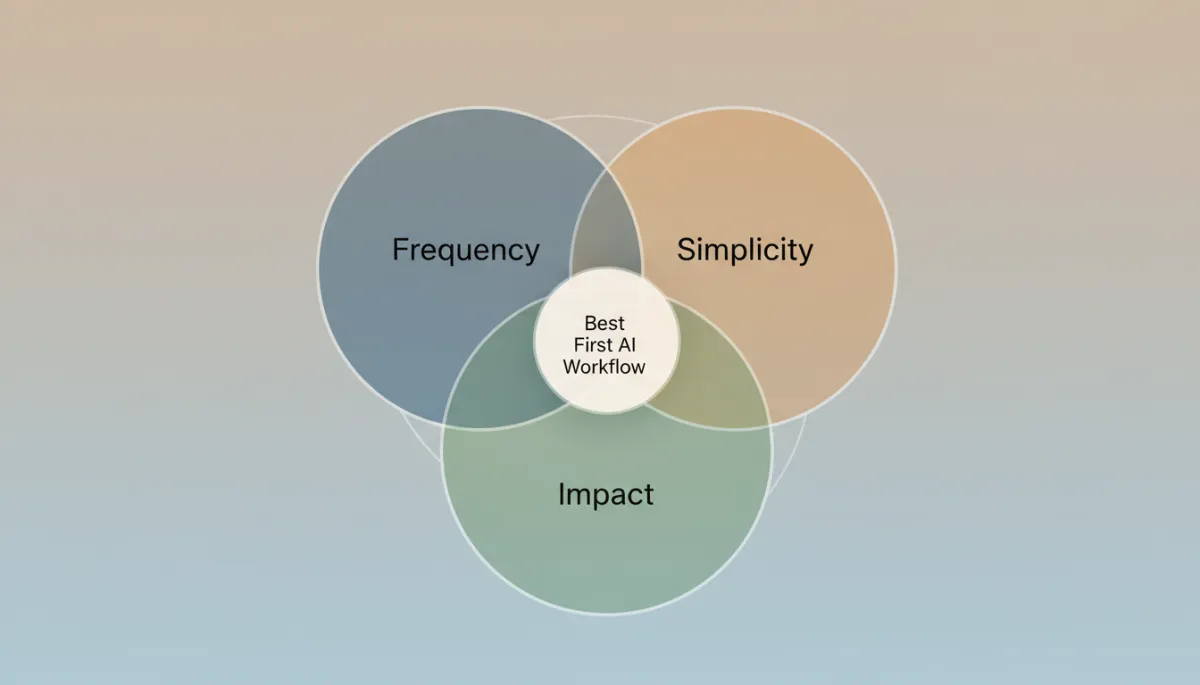
The best first AI workflow sits where frequency, simplicity, and impact overlap.
Best First AI Workflows for Small Businesses
Workflow 1: Missed-Call Text Back Workflow
Trigger: A call is missed during business hours or after hours.
Send an instant text acknowledging the missed call and asking how you can help.
Use AI to ask a few short questions to understand the need and urgency.
Detect urgent issues (for example, “no heat,” “water leak,” “emergency”).
Notify the right team member or on-call technician for urgent cases.
Create or update a CRM record with the caller’s details and conversation.
Why it works: This missed call text back workflow recovers leads that would otherwise go to voicemail and then to a competitor. It is one of the highest-ROI AI workflow examples for local service businesses.
Workflow 2: New Lead Response Workflow
Trigger: A website form, chat message, or email inquiry comes in.
AI sends a friendly, branded response within seconds, confirming receipt.
AI asks 2–4 qualifying questions (location, timeline, budget range, service type).
CRM is updated automatically with the answers and lead status.
A booking link is sent or a call-back time is confirmed if appropriate.
A simple AI lead follow-up workflow continues if the lead does not book.
Why it works: This automated lead response workflow improves speed-to-lead, which is critical in competitive markets like real estate, med spas, and home services. Faster response usually means more booked appointments.
Workflow 3: Appointment Reminder Workflow
Trigger: An appointment is booked in your calendar or scheduling tool.
Send instant confirmation with date, time, location, and preparation steps if needed.
Send a reminder 24 hours before the appointment with reschedule options.
Send a final reminder 2 hours before the appointment.
If the customer no-shows, trigger a follow-up asking to rebook.
Why it works: This appointment booking automation reduces no-shows and saves admin time in clinics, med spas, and consulting practices. It is a classic business workflow automation win.
Workflow 4: Quote Follow-Up Workflow
Trigger: A quote or estimate is sent from your CRM or quoting tool.
Day 1: Send a friendly check-in asking if they have any questions.
Day 3: Send a brief value reminder about what is included and why it matters.
Day 5: Send a quick SMS asking if they are still considering the project.
If no response, create a task for a personal follow-up call.
Why it works: This automated follow-up workflow prevents warm leads from quietly going cold, especially in higher-ticket services like remodeling, roofing, or consulting packages.
Workflow 5: Review Request Workflow
Trigger: A job is marked complete or an appointment is finished.
Send a thank-you message shortly after the visit or service.
After a short delay, send a simple review request with a direct link.
If feedback is negative, route it internally instead of posting publicly.
If feedback is positive, follow up with a thank-you and maybe a referral offer.
Why it works: This workflow automation for small business strengthens your online reputation and builds trust with future customers.
The 5-Phase Process to Build Your First AI Workflow
1. Document the Current Process
Before you touch any tools, write down what happens today, step by step. This is the most underrated part of business process automation. Answer questions like:
What starts the process? (missed call, form, quote sent, etc.)
Who handles it right now?
What steps happen next, and in what order?
Where do delays or dropped balls usually occur?
What information is needed to do this well (name, service type, date, etc.)?
What does success look like? (booked appointment, paid deposit, review left)
Example: For a plumbing company, the current process for missed calls might be: call comes in after hours → caller leaves voicemail (sometimes) → owner checks voicemail next morning → owner calls back → often the customer has already booked with someone else. This is exactly the kind of gap a simple AI workflow automation can close.
2. Design the Automated Version
Next, decide what the automated version should do and where humans should still be involved. Define:
The trigger (missed call, new form, appointment booked, etc.)
The first response (text, email, or chat message)
The questions AI should ask to qualify or route the lead
The conditions (for example, urgent vs routine, new vs existing customer)
The CRM workflow automation steps (create or update records, set statuses)
The notifications (who should be alerted, and when)
The follow-up sequence (how many messages, over how many days)
The human handoff rules (what should cause a person to step in)
Example: Missed call → instant SMS → AI asks what is needed → if urgent, alert on-call tech → if routine, send booking link → update CRM with details → start 2-day follow-up if no booking. This is a clean, beginner-friendly AI workflow.
3. Build and Test the Workflow
Now you translate your design into a real workflow using an automation platform or by working with a partner like SimplySync AI. Even if you never touch the technical side, it helps to understand what is happening behind the scenes. A simplified pseudo-code version of a missed-call workflow might look like this:
# Pseudo-code for a missed-call text back AI workflow

def handle_missed_call(call):
    caller_number = call.from_number

    send_sms(
        to=caller_number,
        message="Hi, we just missed your call. How can we help you today?"
    )

    response = wait_for_reply(from_number=caller_number, timeout_minutes=15)

    if not response:
        tag_lead(caller_number, "no_response")
        notify_team("Missed call with no response from " + caller_number)
        return

    intent, urgency = analyze_message_with_ai(response.text)

    update_crm(
        phone=caller_number,
        last_message=response.text,
        intent=intent,
        urgency=urgency
    )

    if urgency == "high":
        notify_team("Urgent lead from " + caller_number + ": " + response.text)
    else:
        send_sms(
            to=caller_number,
            message="Thanks for the details. You can book a time here: https://yourbookinglink.com"
        )
        start_follow_up_sequence(caller_number)
When testing, make sure you:
Test normal cases (typical customer inquiry with clear answers).
Test urgent cases (emergencies, same-day needs).
Test no-response cases (customer never replies to the first message).
Test wrong or incomplete information (typos, vague answers).
Confirm CRM records are updated correctly every time.
Confirm the right team member receives notifications.
SimplySync AI handles the heavy lifting here—connecting your CRM, SMS, email, forms, calendars, and AI engine—so you can focus on the process, not the tools.
4. Launch as a Pilot
Do not “set it and forget it” on day one. Treat your first AI automation for small businesses as a pilot. Run it for a defined period—say 2 to 4 weeks—and monitor:
Did the workflow trigger every time it should have?
Did messages send correctly and on time?
Did leads understand the messages and respond?
Did CRM records and statuses update the way you expected?
Did the right person get notified for urgent or complex cases?
5. Optimize and Expand
Finally, use real results to refine the workflow. Look at metrics like:
Average response time to new leads or missed calls
Reply rate to your first and second follow-up messages
Appointment booking rate from leads handled by the workflow
No-show rate before and after reminders were automated
Number of reviews generated each month
Once your first workflow is performing well, you can confidently expand to the next area—lead nurturing, reactivation campaigns, or deeper CRM workflow automation. SimplySync AI supports this ongoing optimization so your automations keep improving instead of going stale.
A Complete Beginner Example: Missed-Call Text Back Workflow
Business: A local plumbing business with two trucks on the road all day. The owner often cannot answer calls while under a sink or driving between jobs.
Problem: Potential customers leave voicemails—or hang up without leaving one—and then call the next plumber on Google. By the time the owner listens to messages that evening, many have already booked elsewhere. This is lost revenue that could have been saved with simple small business workflow automation.
Workflow:
A call is missed and triggers the AI workflow.
The system sends an instant text: “Hi, this is Smith Plumbing. We just missed your call—what can we help you with today?”
AI reads the reply, identifies the issue (for example, “water leak in kitchen”), and detects if it sounds urgent.
If urgent, the team gets an instant notification with the message and phone number, so they can call back quickly.
If not urgent, AI sends a booking link or offers time windows for a call-back.
The CRM is updated with the customer’s name (if available), phone, issue description, and urgency tag.
If the customer does not book, a short follow-up sequence checks back later that day or the next morning.
Result: The plumbing business responds faster, captures more information, reduces manual callbacks, and recovers leads that used to disappear. This is a textbook example of AI automation for small businesses that feels simple but delivers real revenue.
SimplySync AI can build this end to end—missed-call detection, AI lead qualification, CRM integration, and follow-up sequences—so the owner just sees more booked jobs on the calendar.
What Tools Do You Need for an AI Workflow?
You do not need a complex tech stack to start with no-code automation and AI. A basic AI workflow usually needs:
A trigger source such as a phone system, form, chat widget, email inbox, or CRM event.
An automation platform that can listen for triggers and run workflows.
AI response capability to understand messages and generate natural replies.
Communication channels like SMS and email to talk with leads and customers.
A CRM or at least a structured place to store lead and customer information.
Notifications to alert your team when they need to step in.
You do not need to know how to connect all of this yourself. SimplySync AI designs, builds, connects, and manages these AI workflows so you get the benefits of automation without wrestling with integrations and settings.
DIY vs Done-for-You AI Workflow Automation
When DIY Can Work
You are comfortable exploring new software tools and following tutorials.
You have time to test, troubleshoot, and tweak messages yourself.
Your workflow is simple and does not touch multiple systems or channels.
You are okay managing integrations and occasional errors.
When Done-for-You Is a Better Fit
You want it built correctly the first time, without guesswork.
The workflow directly affects revenue, bookings, or customer experience.
You need CRM, SMS, email, calendar, and AI all working together smoothly.
You prefer to focus on running your business, not managing tools.
SimplySync AI positions itself as a done-for-you or guided automation partner. You bring your business goals and processes; they bring the strategy, build, and ongoing optimization.
Common Mistakes When Building Your First AI Workflow
Trying to automate too much at once instead of one clear process.
Starting with a process that is too complex or rare in your business.
Skipping documentation of the current process and jumping straight into tools.
Not clearly defining the trigger that should start the AI workflow.
Forgetting to write clear handoff rules for when humans should take over.
Not testing edge cases like wrong numbers, partial answers, or no response.
Sending generic, robotic messages that do not match your brand voice.
Forgetting to update the CRM, leaving your team blind to what happened.
Not measuring results, so you cannot prove the value of the workflow.
Your First AI Workflow Checklist
Use this checklist to confirm you are ready to launch your first AI workflow automation:
I know the specific problem I want this workflow to solve.
The process happens often enough to matter for my business.
The steps are repeatable and can be explained in 3–7 steps.
I know exactly what should trigger the workflow (missed call, form, etc.).
I know what the AI should say or ask in the first message or two.
I know when a human should take over and how they will be notified.
I know what should be updated in the CRM (status, notes, tags, etc.).
I have at least one success metric (bookings, response time, reviews) to track.
I have tested normal cases and edge cases before going live fully.
What to Build After Your First Workflow Works
Once your first workflow is stable and delivering value, it is tempting to jump into ten new ideas. Instead, build out your automation in layers. Good next steps include:
Add deeper follow-up sequences for leads that have not yet booked or purchased.
Add appointment reminders and post-visit follow-ups to reduce no-shows.
Add review requests and referral prompts after successful jobs or visits.
Add CRM task automation so your team gets clear to-dos for edge cases.
Add lead scoring or routing to prioritize high-value opportunities.
Key point: AI automation grows best one workflow at a time. Each new workflow should build on the foundation of the last, not replace it.
FAQs About AI Workflows for Small Businesses
What is an AI workflow?
An AI workflow is a connected series of automated steps that uses AI and business rules to complete a process. It starts with a trigger, performs actions, makes simple decisions, updates systems like your CRM, and notifies humans when needed.
How do I build an AI workflow for my small business?
Start by documenting a frequent, simple process. Design the automated version (trigger, messages, decisions, CRM updates, handoff rules), then build and test it in an automation platform or with a partner like SimplySync AI. Launch it as a pilot, measure results, and refine it before expanding to other workflows.
What is the best first AI workflow to build?
For most service and appointment-based businesses, the best first workflow is either a missed-call text back workflow or a new lead response workflow. Both are simple, frequent, and directly tied to revenue and customer experience.
Do I need technical experience to automate a workflow?
No. You need to understand your business process and what you want the workflow to do. The technical build can be handled by no-code tools or by a done-for-you partner like SimplySync AI. Many of their clients have zero technical background.
What tasks can AI workflows automate?
AI workflows can automate lead responses, qualification questions, appointment booking, reminders, missed-call text back, quote follow-up, review requests, CRM updates, and routine customer communication like FAQs and status updates.
Can AI workflows respond to missed calls?
Yes. A missed call text back workflow is one of the most effective uses of AI automation for small businesses. It automatically texts callers you miss, asks what they need, and routes urgent issues to your team.
Can an AI workflow update my CRM?
Yes. CRM workflow automation is a core part of most AI workflows. The system can create new contacts, update statuses, add notes from conversations, and create tasks for your team automatically.
How long does it take to build an AI workflow?
A focused first workflow—like missed-call text back or new lead response—can often be designed, built, and launched in a few days to a couple of weeks, depending on your tools and how quickly decisions are made. SimplySync AI aims to get clients live quickly with a clear pilot and optimization plan.
Should I build AI workflows myself or hire help?
If you enjoy tech and have time, you can start with simple DIY automations. If your time is limited, your workflows touch revenue, or you need multiple systems connected, a guided or done-for-you partner like SimplySync AI is usually the better investment.
How does SimplySync AI help build AI workflows?
SimplySync AI helps you choose the right first workflow, designs it with you, connects your systems, builds and tests the automation, and then monitors and improves it over time. They specialize in practical workflows for missed-call text back, new lead response, appointment booking, CRM automation, follow-up, review requests, and everyday customer communication.
Take the Next Step with SimplySync AI
Your first AI workflow does not need to be complicated. It just needs to solve one real problem clearly and consistently—like recovering missed calls, responding to new leads faster, or reducing no-shows. With the right partner, workflow automation for small business becomes manageable, measurable, and surprisingly straightforward.
SimplySync AI helps small businesses design and build practical AI workflows for missed-call text back, new lead response, appointment booking, CRM automation, follow-up, review requests, and customer communication. If you are ready to stop guessing where to start, SimplySync AI can help you choose and launch your first high-impact AI workflow automation.
Suggested next step: Schedule a brief consult to identify your best first workflow and map out a simple, realistic launch plan.